# Notifications
Story Frameworks `PopupMaster_W` widget blueprint includes a "Custom Popup" that can be used to notify your player of things when necessary.
***
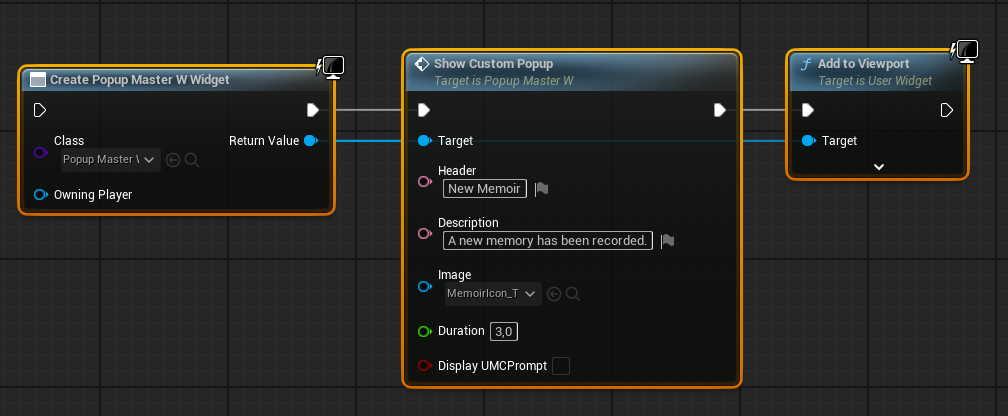
To make use of these custom popups, we can create a new widget of type `PopupMaster_W` , and call the `ShowCustomPopup` event. After which, we can then add the widget to the players viewport. When using this "Custom Popup", the widget will automatically be removed from the players screen after the specified `Duration` .
When using this "Custom Popup", we can define the below parameters,
**— Header** `Text` \
\- The "Title" of the notification.
**— Description** `Text` \
\- A brief description explaining the notification.
**— Image** `Texture2D` \
\- An image displayed on the right-hand side of your notification.
**— Duration** `Float` \
\- A delay (in seconds) that the notification will be on screen for, before being removed.
**— Display UMC Prompt** `Boolean` \
\- Determines whether or not to replace the popup image (mentioned above) with the prompt used to open the UMC, indicating that something has effected a menu within the Unified Menu Container.
***
You'll find examples of these "Custom Popups" used throughout SF's example map to communicate certain actions or events to the player. These notifications help enlighten the player of what exactly has happened, or if something has changed. How you'd like to use these notifications is entirely up to you.